

Map Azure into a Graph
Read Azure through Azure Resource Graph with your own az login, or draw it from an export, an ARM template or Bicep with no access at all.
Two commands, and this is what you get. The rest of this page explains each part, and the quickstart walks through it step by step if this is your first time.
az login
az extension add --name resource-graph      # once
viewert graph map azure --open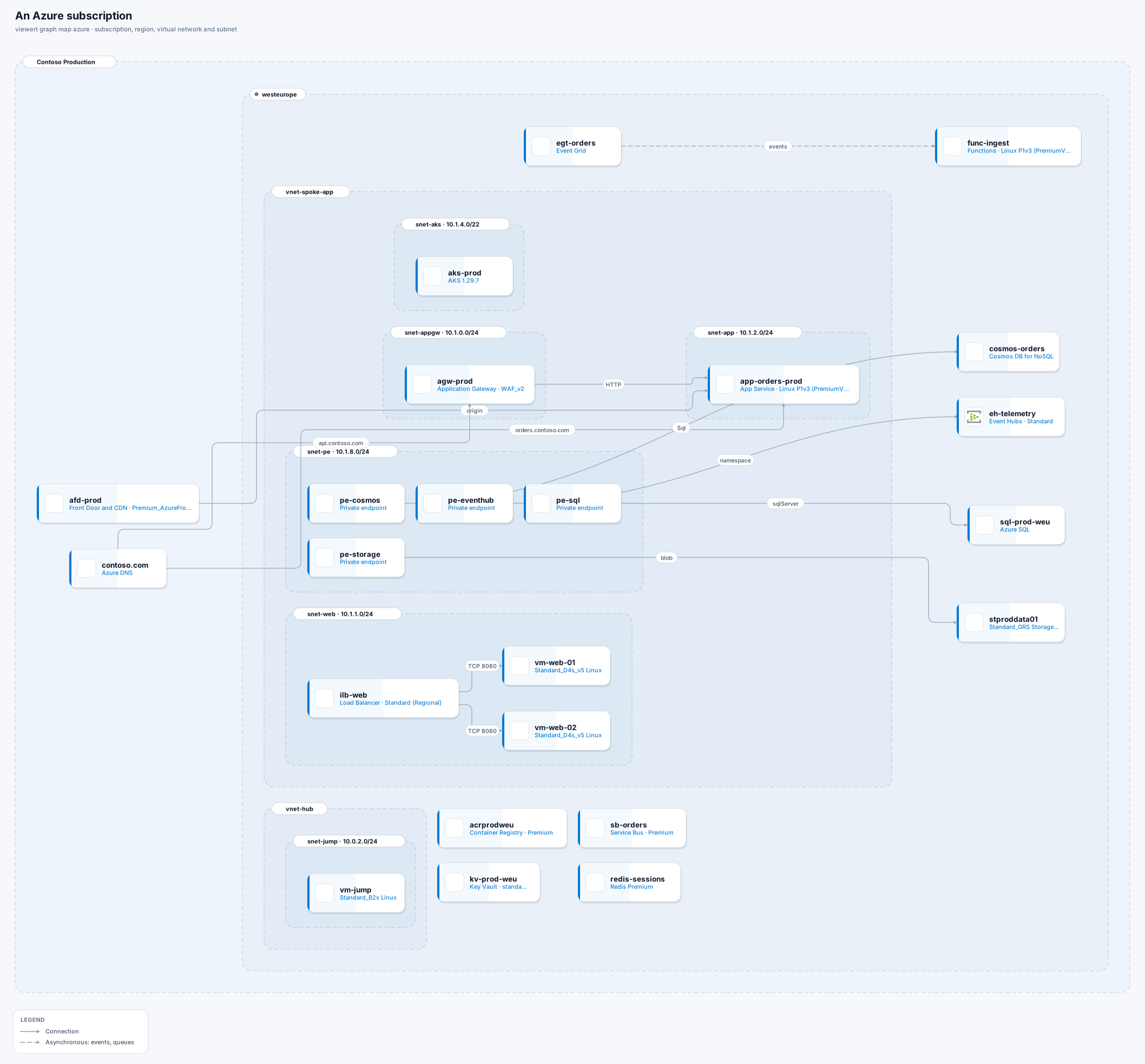
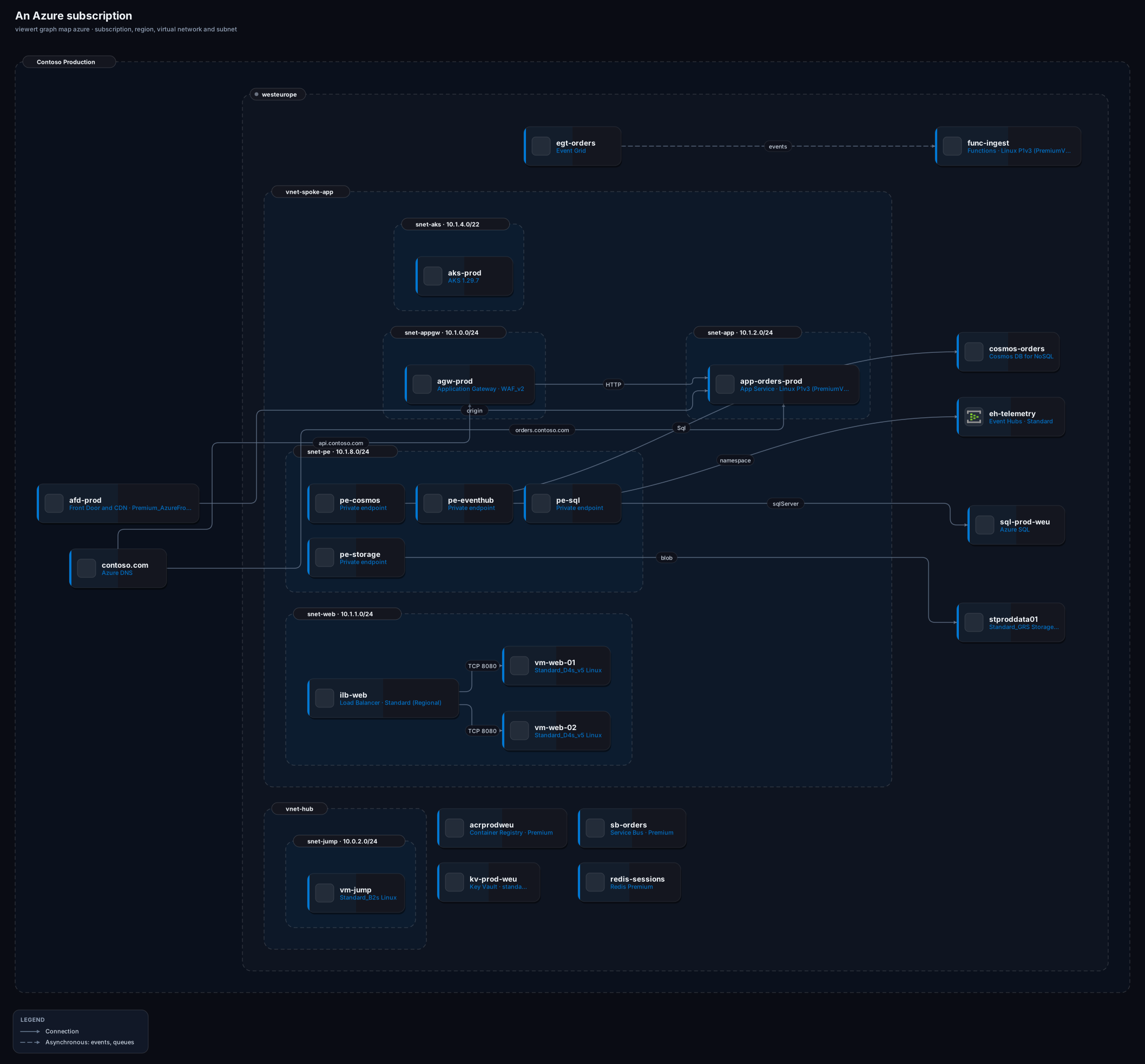
viewert graph map azure: subscription, region, virtual network and subnet.Azure Resource Graph answers one read-only question for every subscription you can see: every resource, with its full identifier, type, location, tags and properties. The CLI asks that question through your own az login, in pages, and builds the Graph from the answer. Nothing else is called, and nothing is created or changed.
You need the Viewert CLI, signed in, and the Azure CLI, signed in, with its Resource Graph extension.
Install and sign in to Viewert
npm install -g @viewert/cli, then viewert login.
Install the Azure CLI, sign in, and add the extension
az login, then az extension add --name resource-graph (once). az account list -o table shows the subscriptions you can see.
Make sure you may read
The Reader role on a subscription (or a management group) is enough: Resource Graph returns exactly what the signed-in identity may read, and nothing it may not.
By default every subscription your login can see is mapped, each as its own frame. Narrow it with --subscription and -g.
# the queries that would be run (nothing is called)
viewert graph map azure --dry-run

# every subscription you can see
viewert graph map azure --open

# one subscription, or only some resource groups
viewert graph map azure --subscription 00000000-0000-0000-0000-000000000000 --open
viewert graph map azure -g rg-prod-web -g rg-prod-dataEvery resource uses the official Azure icon for its service. Boundaries are the subscription, the region, the virtual network and the subnet: a resource that sits in a subnet is drawn inside it, found through its network interface, its private endpoint, its VNet integration or its node pool. The resource group is a property of every resource and a view of its own, because a hub-and-spoke estate puts one network's resources in many resource groups.
- Drawn as a node
- Virtual machines, scale sets, AKS, Container Apps, Container Instances, App Service apps, Functions, Spring Apps, Batch
- Read as a fact or a line
- VM size, image, zone, plan size, node counts
- Drawn as a node
- Load Balancer, Application Gateway, Front Door and CDN, Traffic Manager, Firewall, Bastion, VPN gateways, NAT gateway, Private endpoints, DNS zones, API Management, Static Web Apps
- Read as a fact or a line
- Backend pools, origins, DNS records, Private Link targets
- Drawn as a node
- SQL (a server counts its databases), Managed Instance, PostgreSQL and MySQL, Cosmos DB, Redis, Storage, Key Vault, Container Registry, AI Search, Data Explorer
- Read as a fact or a line
- Public network access, firewall rules, SKU
- Drawn as a node
- Service Bus, Event Hubs, Event Grid, SignalR
- Read as a fact or a line
- Event subscriptions
- Drawn as a node
- Network interfaces, public IP addresses, network security groups, route tables, App Service plans, managed disks
- Read as a fact or a line
- Public IP, open ports, plan size
| Area | Drawn as a node | Read as a fact or a line |
|---|---|---|
| Compute | Virtual machines, scale sets, AKS, Container Apps, Container Instances, App Service apps, Functions, Spring Apps, Batch | VM size, image, zone, plan size, node counts |
| Edge | Load Balancer, Application Gateway, Front Door and CDN, Traffic Manager, Firewall, Bastion, VPN gateways, NAT gateway, Private endpoints, DNS zones, API Management, Static Web Apps | Backend pools, origins, DNS records, Private Link targets |
| Data | SQL (a server counts its databases), Managed Instance, PostgreSQL and MySQL, Cosmos DB, Redis, Storage, Key Vault, Container Registry, AI Search, Data Explorer | Public network access, firewall rules, SKU |
| Messaging | Service Bus, Event Hubs, Event Grid, SignalR | Event subscriptions |
| Folded into facts | Network interfaces, public IP addresses, network security groups, route tables, App Service plans, managed disks | Public IP, open ports, plan size |
Azure's resources refer to each other by their full identifiers, and the CLI follows them.
Declared
A load balancer or Application Gateway to the machines or apps in its backend pool; a private endpoint to the service it connects to; a DNS record to what it points at; a Front Door or API Management origin to the app it names; an Event Grid subscription from a topic to its destination; anything else one resource names by identifier in its own configuration (shown as “depends on”).
Internet exposure
A public IP address on a machine, a load balancer, a gateway or a firewall; a network security group rule that lets *, Internet or 0.0.0.0/0 in (with the ports); a web app, Front Door or Traffic Manager (a public entry point); an API Management that is not in a virtual network; an AKS API server that is not private; and any data service whose public network access is on and whose network rules do not default to Deny.
What Azure does not say
Which application uses which database. An app's connection strings are settings, not resource properties, and a deployed estate does not reveal them. Draw those lines by hand, or map the Terraform or ARM template that defines them.
Someone with access, or the repository that built the environment, gives you a file and nothing is contacted.
# a Resource Graph export
az extension add --name resource-graph
Q="Resources | project id, name, type, location, resourceGroup, subscriptionId, kind, managedBy, sku, tags, zones, properties"
az graph query -q "$Q" --first 1000 -o json > page1.json
#   more than 1000? pass the \"skip_token\" of the last page: az graph query -q "$Q" --first 1000 --skip-token "<token>" -o json > page2.json
jq -s '{data: map(.data[])}' page*.json > azure.json

# just the list, no properties
az resource list -o json > resources.json

# a template
az group export --name rg-prod-web > template.json
az bicep build --file main.bicep --stdout > main.json

viewert graph map azure --from-snapshot azure.json --open
viewert graph map azure --from-snapshot template.json --open
viewert graph map azure --from-snapshot azure.json --subscription 00000000-0000-0000-0000-000000000000
A Resource Graph export (best)
The same answer the live read uses. Run the query and save it; a page holds up to 1,000 resources, so a larger estate is paged with --skip-token and the pages joined (the snippet below, which needs jq).
`az resource list`
Every resource, but with no properties, so no connections: you get the boxes, where they are, and a note saying az graph query has more.
An ARM template, or Bicep
What the environment is defined to be: az group export writes the template of a deployed resource group, and Bicep is compiled with az bicep build. Names and properties are evaluated the way Azure does (parameters, variables, concat, format, resourceId, copy loops, conditions, nested templates), and what cannot be known before deployment is a marker, never a guess.
Specific to Azure:
The az command was not found
Install the Azure CLI, or map from a file with --from-snapshot.
Not signed in
az login. Nothing was read.
The Azure CLI has no Resource Graph extension
az extension add --name resource-graph, then run it again.
Only some subscriptions appear
Resource Graph returns what your identity may read. Ask for Reader on the others, or pass --subscription.
A template has a linked template
Only what is in the file is drawn, and a note says a linked template was not read. Compile or flatten it first.
A name has ‹something› in it
A template names a resource with a value known only at deployment (a parameter with no default). The marker is left out of the label; the identity stays unique.