

Quickstart: AWS to a Shareable Graph
From nothing installed to a diagram of your AWS account that your teammates can open, in about five minutes. Every step shows what you should see.
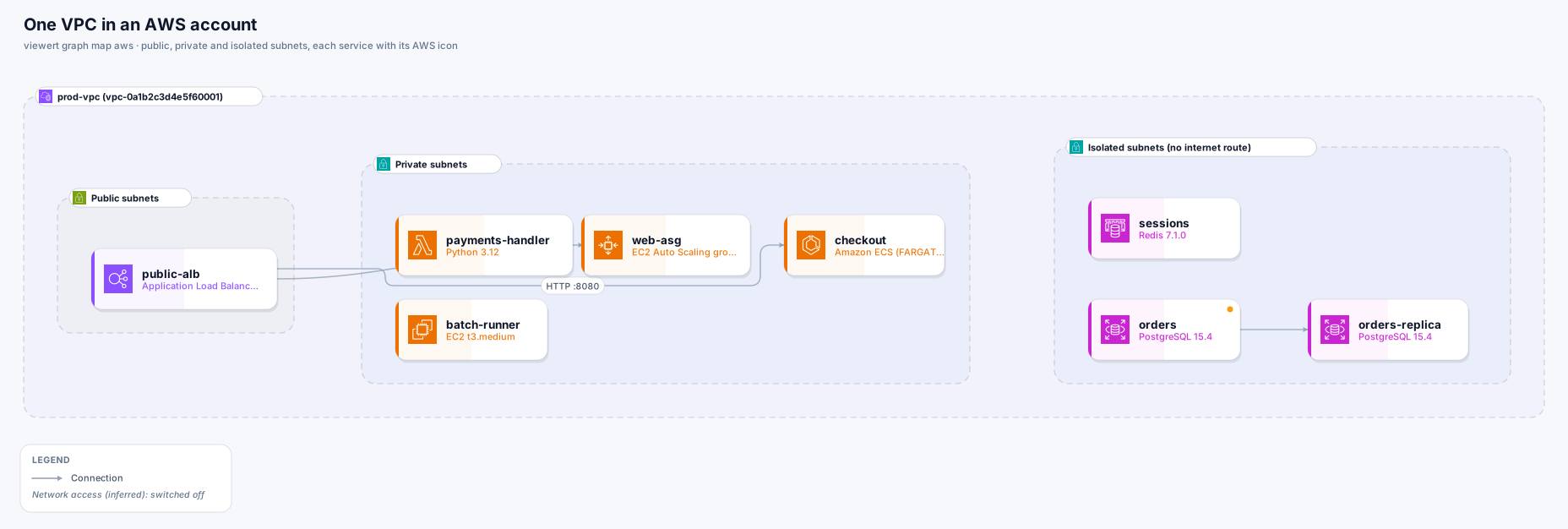
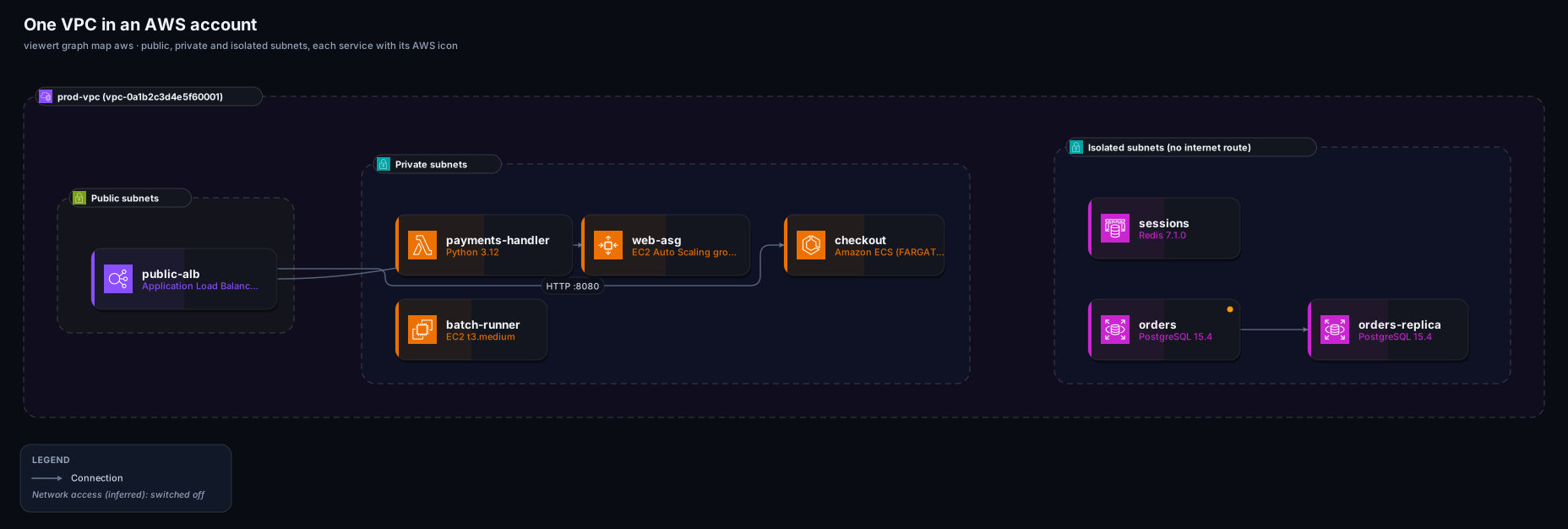
A diagram like this one, of your own AWS account: every service with its AWS icon, grouped by region, network and subnet, with lines showing how they connect. You can open it in your browser, tidy it, and send it to teammates as a link or a picture.
aws s3 ls in a terminal today, you already have two of them.A terminal
Terminal on a Mac, any shell on Linux, PowerShell on Windows.
The AWS CLI, signed in
Check with aws sts get-caller-identity: if it prints an account number, you are ready. If not, ask your team how you sign in to AWS from the terminal (most companies use aws sso login).
A Viewert account
Free to create at viewert.com. This is where your diagram will be kept.
Pick the one that fits your computer. You only do this once.
# any computer with Node.js
npm install -g @viewert/cli

# macOS or Linux with Homebrew
brew tap viewert/viewert && brew install viewert

# check it worked: this prints a version number
viewert versionThis opens your browser once so you can approve the tool. After that it remembers you.
viewert loginAdd --dry-run and the tool prints every command it would send to AWS, and sends none. Every one is a list or describe: it can't change anything. Swap us-east-1 for the region you use.
viewert graph map aws --region us-east-1 --dry-runRun the same command without --dry-run, and add --open so the diagram opens in your browser when it is ready. It takes from a few seconds to a couple of minutes, depending on how much is in the account.
viewert graph map aws --region us-east-1 --openSomething like this. The numbers will be yours. The warnings (if any) say what could not be read, and the link is your new Graph.
✓ Mapped 47 resources, 61 connections and 9 groups
  12 lambda function · 6 ec2 instance · 4 rds instance · 3 sqs queue · +14 more kinds
warning: Could not read `aws kinesis list-streams` (us-east-1: not allowed to read this).
✓ Saved AWS acme · us-east-1 (private)
  https://viewert.com/graph/01J8Z…
It is private. To share it: open it, click the lock at the top to make it public and send the link, or use Export for a PNG or SVG.The Graph opens in the editor with a short note on how to read it. The five things worth trying first:
Click a box
You get its full name, its identifier with a copy button, a link that opens it in the AWS console, and its settings.
Click a line
It tells you which setting says the two things are connected, and whether Viewert found it written down (solid) or worked it out (dotted).
Open Views
Ready-made views: Request path (how traffic gets in), Data stores, Messaging, and Internet exposure (everything whose settings let the internet in).
Turn on Layers
Edge, Compute, Data and Messaging can be switched on and off. A Network access (inferred) layer starts switched off because it can be busy.
Tidy it
Drag a box where you want it, rename it, delete what you do not need, or add a box or line Viewert could not know about. Everything saves as you go.
Find the message you got:
aws: command not found- What it means
- The AWS CLI is not installed
- Do this
- Install the AWS CLI from AWS's documentation, or draw from a file (recipe)
not signed in or ExpiredToken- What it means
- Your AWS sign-in ran out
- Do this
aws sso login(or however you sign in), then run it again
No region- What it means
- It does not know which region
- Do this
- Add
--region us-east-1(use yours), or--all-regions
Could not read … not allowed- What it means
- Your AWS role cannot list that service
- Do this
- The map goes on without it. To include it, ask for the read-only policy in the reference
Nothing was found- What it means
- The region is empty, or your role sees nothing there
- Do this
- Check the region, and try
aws ec2 describe-vpcs --region us-east-1
Graph limit reached- What it means
- Your Viewert plan's number of Graphs is used up
- Do this
- Delete an old one, or re-use one with
--replace GRAPH-ID
- What it means
- A large account
- Do this
- Use Views, or map less:
--only ec2,rds,lambda(recipe)
- What it means
- Every account is different
- Do this
- Tell us: a diagram that is drawn wrongly is the best bug report we can get
| You see | What it means | Do this |
|---|---|---|
aws: command not found | The AWS CLI is not installed | Install the AWS CLI from AWS's documentation, or draw from a file (recipe) |
not signed in or ExpiredToken | Your AWS sign-in ran out | aws sso login (or however you sign in), then run it again |
No region | It does not know which region | Add --region us-east-1 (use yours), or --all-regions |
Could not read … not allowed | Your AWS role cannot list that service | The map goes on without it. To include it, ask for the read-only policy in the reference |
Nothing was found | The region is empty, or your role sees nothing there | Check the region, and try aws ec2 describe-vpcs --region us-east-1 |
Graph limit reached | Your Viewert plan's number of Graphs is used up | Delete an old one, or re-use one with --replace GRAPH-ID |
| It opens but looks tiny or crowded | A large account | Use Views, or map less: --only ec2,rds,lambda (recipe) |
| Something looks wrong | Every account is different | Tell us: a diagram that is drawn wrongly is the best bug report we can get |
The recipes answer the things people do next: no AWS access, Terraform instead of a live account, several regions, keeping the diagram up to date, putting it in slides. The AWS guide explains everything that is drawn and how each connection is decided.