

Map AWS into a Graph
Read an AWS account read-only with your own credentials, or build the Graph from an AWS Config snapshot when nobody wants to hand over access.
Two commands, and this is what you get. The rest of this page explains each part, and the quickstart walks through it step by step if this is your first time.
aws sso login                                          # or however you sign in to AWS
viewert graph map aws --region us-east-1 --open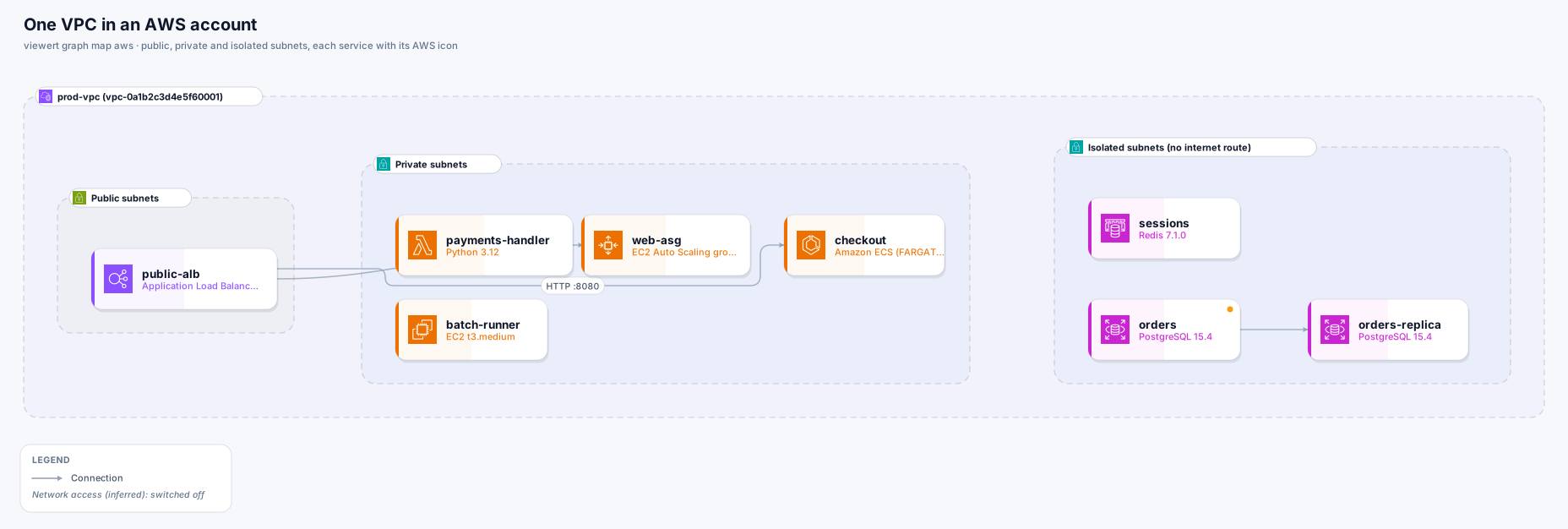
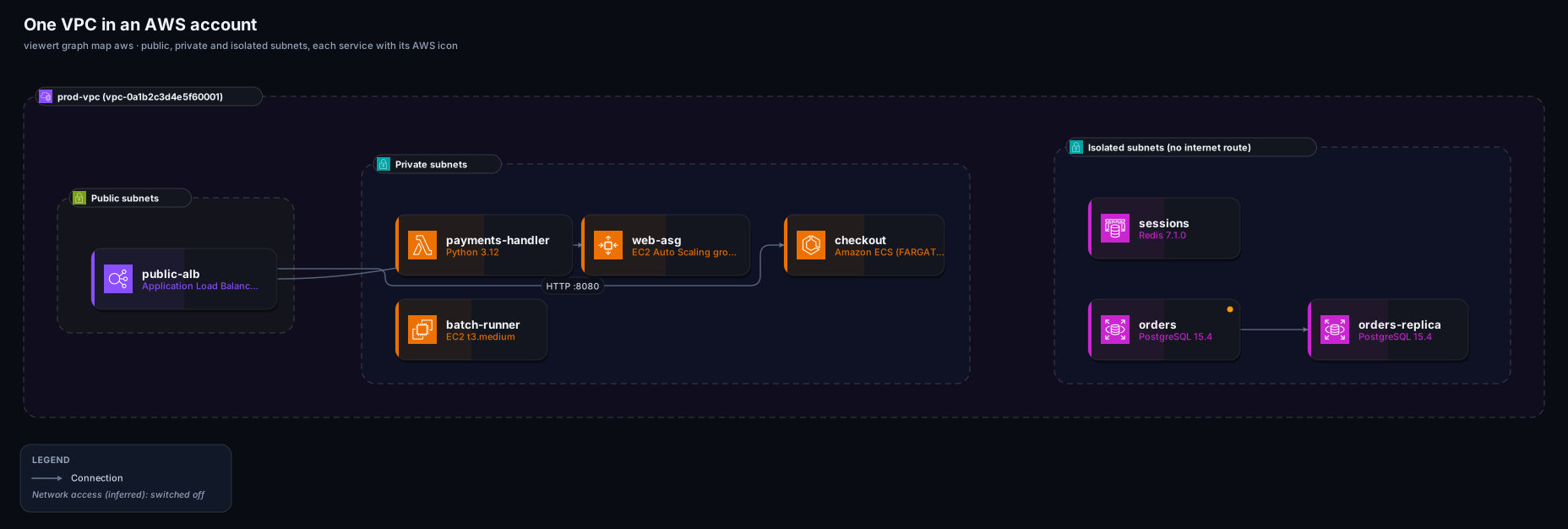
viewert graph map aws. Click to see it full size.You need the Viewert CLI, signed in, and the AWS CLI, signed in as someone who may read.
Install and sign in to Viewert
npm install -g @viewert/cli, then viewert login.
Install the AWS CLI and sign in
aws sso login for an SSO profile, or aws configure. aws sts get-caller-identity shows who you are.
Make sure you may read
The ReadOnlyAccess managed policy covers everything this reads. A narrower policy works too: the reference has the exact one, with only the 44 read actions the CLI uses. Anything you may not read is skipped and named in the Graph's description; it never stops the map.
Choose the profile and the regions; look at the commands first if you like.
# every command that would be run (nothing is called)
viewert graph map aws --region us-east-1 --dry-run

# map one region and open the Graph
viewert graph map aws --region us-east-1 --open

# a named profile, several regions, or all of them
viewert graph map aws --profile prod --region us-east-1 --region eu-west-1
viewert graph map aws --profile prod --all-regions

# only some services, or everything except some
viewert graph map aws --region us-east-1 --only ec2,rds,elbv2
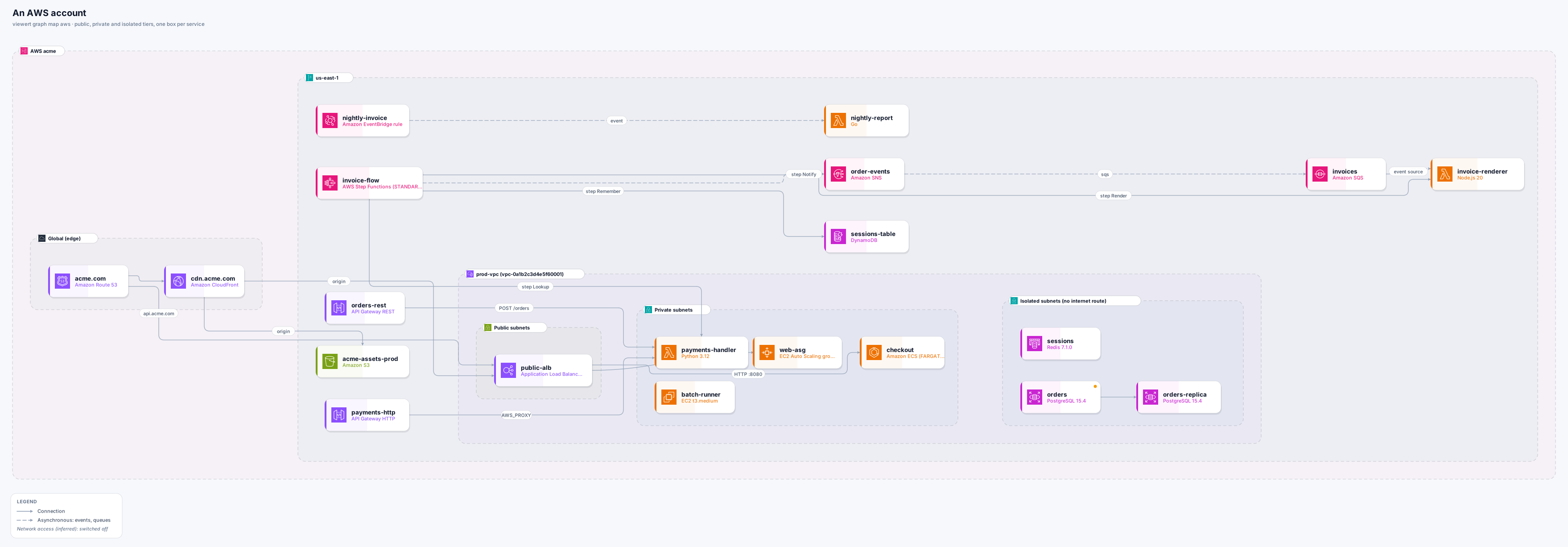
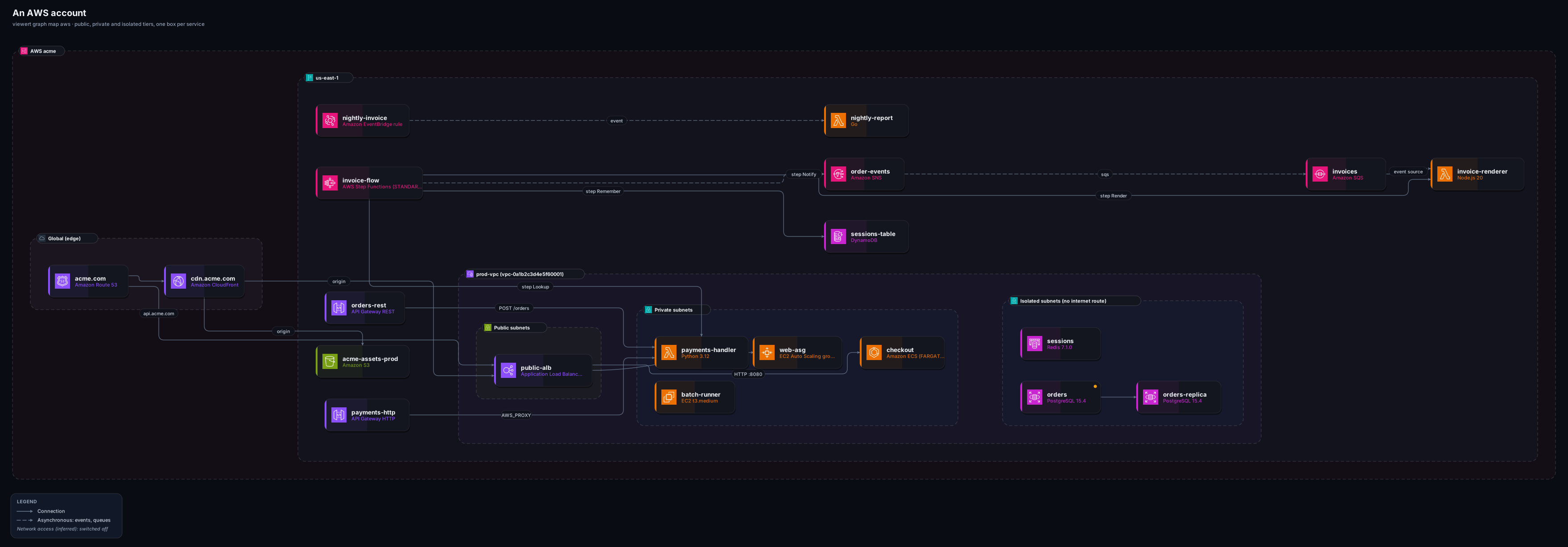
viewert graph map aws --region us-east-1 --skip lambdaEvery resource uses the official AWS icon for its service, in AWS's colours. Boundaries are the account, the Region and the VPC, with the AWS marks for each.
- Drawn as a node
- EC2 instances, Auto Scaling groups (one node for the group), ECS services, EKS clusters, Lambda functions, Step Functions state machines
- Read as a fact or a line
- A Lambda function URL (and whether it needs a sign-in), instance zone, public IP
- Drawn as a node
- Application, Network and Classic load balancers, API Gateway (REST and HTTP), CloudFront, Route 53 zones
- Read as a fact or a line
- Listeners and target groups, API integrations, DNS aliases
- Drawn as a node
- RDS and Aurora, ElastiCache, OpenSearch, DynamoDB, S3, EFS
- Read as a fact or a line
- Read replicas, encryption, multi-AZ
- Drawn as a node
- SQS, SNS, Kinesis, EventBridge rules, MSK
- Read as a fact or a line
- Subscriptions, event-source mappings, rule targets
- Drawn as a node
- IAM roles and policies, log groups, alarms, snapshots, individual instances of an autoscaled group
- Read as a fact or a line
- Security groups and route tables become tiers, exposure and inferred lines
| Area | Drawn as a node | Read as a fact or a line |
|---|---|---|
| Compute | EC2 instances, Auto Scaling groups (one node for the group), ECS services, EKS clusters, Lambda functions, Step Functions state machines | A Lambda function URL (and whether it needs a sign-in), instance zone, public IP |
| Edge | Application, Network and Classic load balancers, API Gateway (REST and HTTP), CloudFront, Route 53 zones | Listeners and target groups, API integrations, DNS aliases |
| Data | RDS and Aurora, ElastiCache, OpenSearch, DynamoDB, S3, EFS | Read replicas, encryption, multi-AZ |
| Messaging | SQS, SNS, Kinesis, EventBridge rules, MSK | Subscriptions, event-source mappings, rule targets |
| Left out on purpose | IAM roles and policies, log groups, alarms, snapshots, individual instances of an autoscaled group | Security groups and route tables become tiers, exposure and inferred lines |
Where the route tables say a VPC has public, private and isolated subnets, resources are drawn in the tier their subnets are in: public for what faces the internet, private for what runs behind it, isolated for data with no route out, each with AWS's own subnet mark. A tier is drawn only where resources fall in at least two of them. Each resource says which Availability Zone it is in.
What counts as exposed
An internet-facing load balancer, a database set to be publicly accessible, an instance with a public IP address, a CloudFront distribution, a Lambda function URL that needs no sign-in, and any resource in a security group that lets 0.0.0.0/0 or ::/0 in (with the ports).
What it does not claim
That something is reachable, or safe. A network ACL, a route or a login elsewhere may still stop it. The facts are what the configuration says, listed in the Internet exposure view.
A connection is drawn only when something in the configuration shows it, and its description says what.
Declared
A load balancer's target groups, a CloudFront origin, a Route 53 alias, an event-source mapping, an SNS subscription, an API Gateway integration, an EventBridge target, a Step Functions state that starts a function or queue, a read replica.
Inferred (dotted)
A security group that lets another group in on a database or cache port: code that can reach the data store. These sit on the Network access layer, which starts switched off when there are many.
If AWS Config records the account, someone with access can export it and you give the CLI the file. Nothing is contacted. JSON, newline-delimited JSON and .json.gz are all read as they come.
# a Config snapshot, delivered to the channel's S3 bucket as .json.gz
aws configservice deliver-config-snapshot --delivery-channel-name default

# or a query, saved as it prints
aws configservice select-resource-config --expression "SELECT resourceId, resourceType, resourceName, arn, awsRegion, accountId, tags, configuration, relationships" > config.json

# map from the file (several accounts or Regions in one file: choose)
viewert graph map aws --from-snapshot config.json.gz --open
viewert graph map aws --from-snapshot config.json --account 123456789012 --region us-east-1viewert graph snapshot aws reads more than an export does and strips secrets before writing the file.viewert graph snapshot aws --profile prod --region us-east-1 --dry-run # the exact commands
viewert graph snapshot aws --profile prod --region us-east-1 -o snapshot.json
viewert graph map aws --from-snapshot snapshot.json --openEvery message tells you what to do. The ones specific to AWS:
The aws command was not found
Install the AWS CLI, or use --from-snapshot.
Not signed in
aws sso login (or refresh your credentials). Nothing was read.
No region
Pass --region us-east-1 (repeatable) or --all-regions, or set a default region on the profile.
Access denied on some commands
The map goes on; the description lists what could not be read, for example “Could not read aws kinesis list-streams”.
A very large account
A Graph holds up to 2,000 resources and 6,000 connections. Narrow it with --region, --only or --skip.
Cross-account
One account per map. Map each account and keep the Graphs separate.